

How to Build a Company Intranet
Step by step guide to building a modern company intranet without a developer, using no code drag and drop tools.
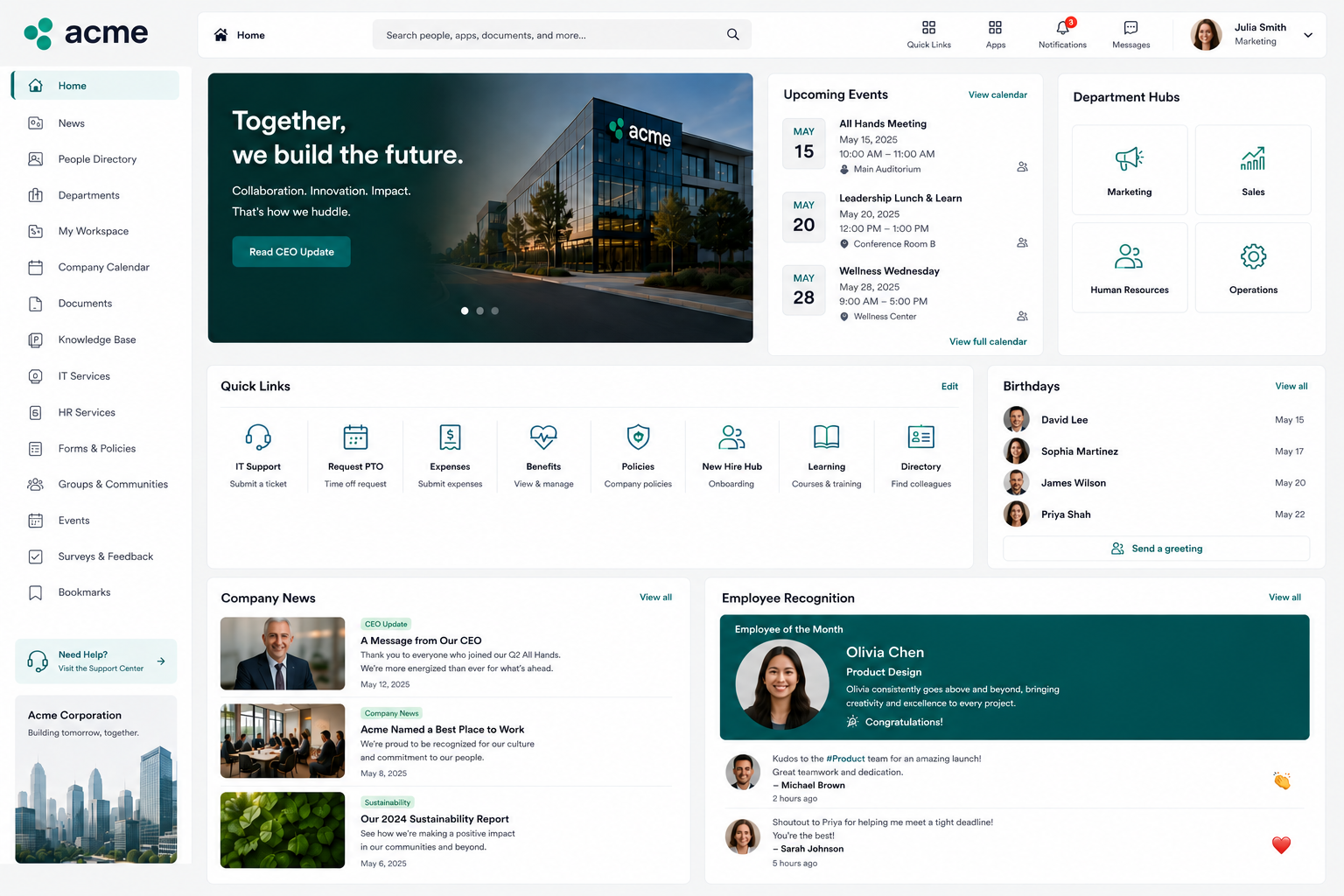
A company intranet is an internal hub where employees find information, access tools, and stay connected to the organization. Done well, it reduces the number of emails asking where to find things, gives new employees a clear starting point, and keeps company wide information in one place instead of scattered across email threads, shared drives, and Slack channels. Done poorly, it becomes a digital filing cabinet nobody opens.
This guide covers what a company intranet should actually include, how to structure one employees will use, and how to build it without a developer or a large internal IT project.
What a Company Intranet Is and Isn't
A company intranet is an internal, access controlled website or portal for employees. It is not the public facing company website. It is not a project management tool, though it may link to one. It is not a communication platform like Slack or Teams, though it may embed feeds from those tools.
The core function of an intranet is to be the place employees go when they need to find something about the company: a policy, a form, a team directory, an announcement, or a link to a tool they use.
A good intranet answers the question "where do I find X?" before the employee has to ask someone else.
What a Company Intranet Should Include
The right content depends on the organization, but most useful intranets include some combination of the following.
Company announcements and news. A place for leadership updates, team news, policy changes, and company wide communications that doesn't require everyone to be on the same email thread.
Employee directory. Names, roles, departments, and contact information for the whole team. Especially useful as a company grows past the point where everyone knows everyone else.
Policy and document library. HR policies, employee handbook, expense policy, IT acceptable use policy, and other reference documents employees need to find without emailing HR.
Onboarding resources. A starting point for new employees, with links to the tools they need, the policies they should read, and the people they should meet.
Benefits and HR information. PTO policy, benefits enrollment information, and links to relevant HR forms or portals.
Request forms. IT request submission, facilities requests, HR queries, expense submission. Forms that give employees a structured way to ask for things without sending an email to a shared inbox.
Links to tools and systems. A curated list of the platforms the company uses (project management, communication, time tracking, finance) with login links and brief descriptions of what each is for.
Department pages. Brief sections for each team covering what the team does, who is on it, and any team specific resources.
What Makes an Intranet Employees Actually Use
The most common intranet failure is building something comprehensive that nobody opens. A few design principles separate useful intranets from shelf ware.
Keep navigation simple. If someone has to click more than twice to find a policy document, it is buried. The top level navigation should cover the 5 to 7 categories employees actually look for: Company, People, HR, IT, Policies, Tools, and Departments (or a similar set that reflects the organization). Everything else lives within those.
Make the homepage answer the most common questions. The intranet homepage should surface the things employees look for most often, recent announcements, quick links to the most used tools, and the employee directory search. It is not a landing page for intranet marketing. It is a utility.
Keep content current. An intranet with outdated information is worse than no intranet, because employees stop trusting it and go back to emailing HR. Assign ownership of each section to a specific person and set a review cadence. Policies should have a "last updated" date visible.
Make it searchable. If the intranet platform does not have a search function, it will not be used. Search is not optional.
Make it accessible from anywhere. Employees should be able to access the intranet from any device, including a phone, without a VPN or a special login that only works on the company network.
How to Structure the Intranet Before Building It
Before opening any tool, map out the structure on paper or in a document. A simple outline with top level sections and the content that belongs in each one takes 30 to 60 minutes and saves significant rework later.
A common starting structure for a small to mid sized company:
Home. Recent announcements, quick links, employee directory search, IT request shortcut.
About. Company overview, mission, leadership team, office locations.
People. Full employee directory, org chart, new hire introductions.
HR. PTO policy, benefits information, onboarding checklist, expense policy, performance review process.
IT. Submit IT request, IT policies, software access requests, equipment request form.
Policies. Employee handbook, code of conduct, data security policy, remote work policy.
Tools. Links to all company tools with login links and brief descriptions.
Departments. Individual pages for each team.
This structure is a starting point, not a template. Adjust it to reflect how the company actually talks about itself and what employees actually ask for.
How to Build a Company Intranet Without a Developer
There are three realistic ways to build a company intranet without a dedicated web developer.
Option 1: Use a purpose built intranet platform. Platforms like Notion, Confluence, or SharePoint can function as intranets by organizing pages and documents into a navigable structure. These tools are familiar to many teams and require no technical setup. The trade off is that they are document tools first and portals second. They handle text and documents well but are less suited for interactive features like request forms that write to a data source, live dashboards, or role based access controls that show different content to different departments.
Option 2: Use a no code portal builder. A no code portal builder gives more control over layout, navigation, and interactive features than a document tool. It connects to existing data sources (like a spreadsheet that tracks employees or a ticketing system), supports form submission that writes back to a source, and can be published to a shareable link with access controls. This approach takes slightly more setup than a document tool but produces a more functional, app like result that covers both the information sharing and the request handling use cases in one place.
Option 3: Use SharePoint or Google Sites. For organizations already on Microsoft 365 or Google Workspace, SharePoint and Google Sites provide intranet style functionality within the existing environment. The trade off is that customization is limited and the interface options are more constrained than a purpose built portal builder.
For teams that want a single portal that serves as both the company intranet and the self service request hub (IT tickets, HR forms, expense submissions), see Employee Self Service Portals: What They Are and How to Build One for how these two use cases can be combined in one tool.
Step by Step: Building a Company Intranet With a No Code Portal Builder
Once the structure is mapped and a platform is chosen, the build itself follows a consistent process.
- Set up the navigation. Create the top level sections identified in the structure outline. In a portal builder, these typically become pages or sections on the canvas.
- Build the homepage. The homepage should include a welcome message or company announcement area, quick links to the most accessed sections, and either a searchable employee directory or a link to one.
- Add static content sections. Add the policy documents, team pages, benefits information, and tool links. These are largely text and links, which can be added quickly once the content is gathered.
- Add interactive elements. Connect request forms to the relevant data sources. An IT request form might write to a spreadsheet or ticketing system. An HR document request might trigger an email notification. These interactive elements are what separate a useful intranet from a static document library.
- Set up access controls. Determine who can see what. Most intranets are accessible to all employees, but some sections (HR administration, IT dashboards) may be restricted to specific roles or departments.
- Publish and communicate the launch. Publish the intranet to a shareable internal URL and communicate the launch to the team. Include a brief description of what is on the intranet and where to find common things. Send a follow up in the first week with a quick guide to the most used sections.
Maintaining a Company Intranet
The most important thing after launching is assigning clear ownership. Each major section should have a designated person responsible for keeping it current. A quarterly review of all content, checking for outdated policies, broken links, and missing information, keeps the intranet from degrading into something employees stop trusting.
Frequently Asked Questions
Related Topics
Build Your Internal Tools With Huddle
Huddle is a zero code application builder that connects to Google Sheets, Airtable, Excel 365, HubSpot, and Salesforce without requiring data migration. Build dashboards, forms, and portals with drag and drop widgets and publish to a shareable link in minutes.
Start building with Huddle