

How to Turn a Spreadsheet Into an App Without Code
Learn how to turn a spreadsheet into a working app or dashboard, without code, without migrating your data, and without losing your source of truth.
What It Means to Turn a Spreadsheet Into an App
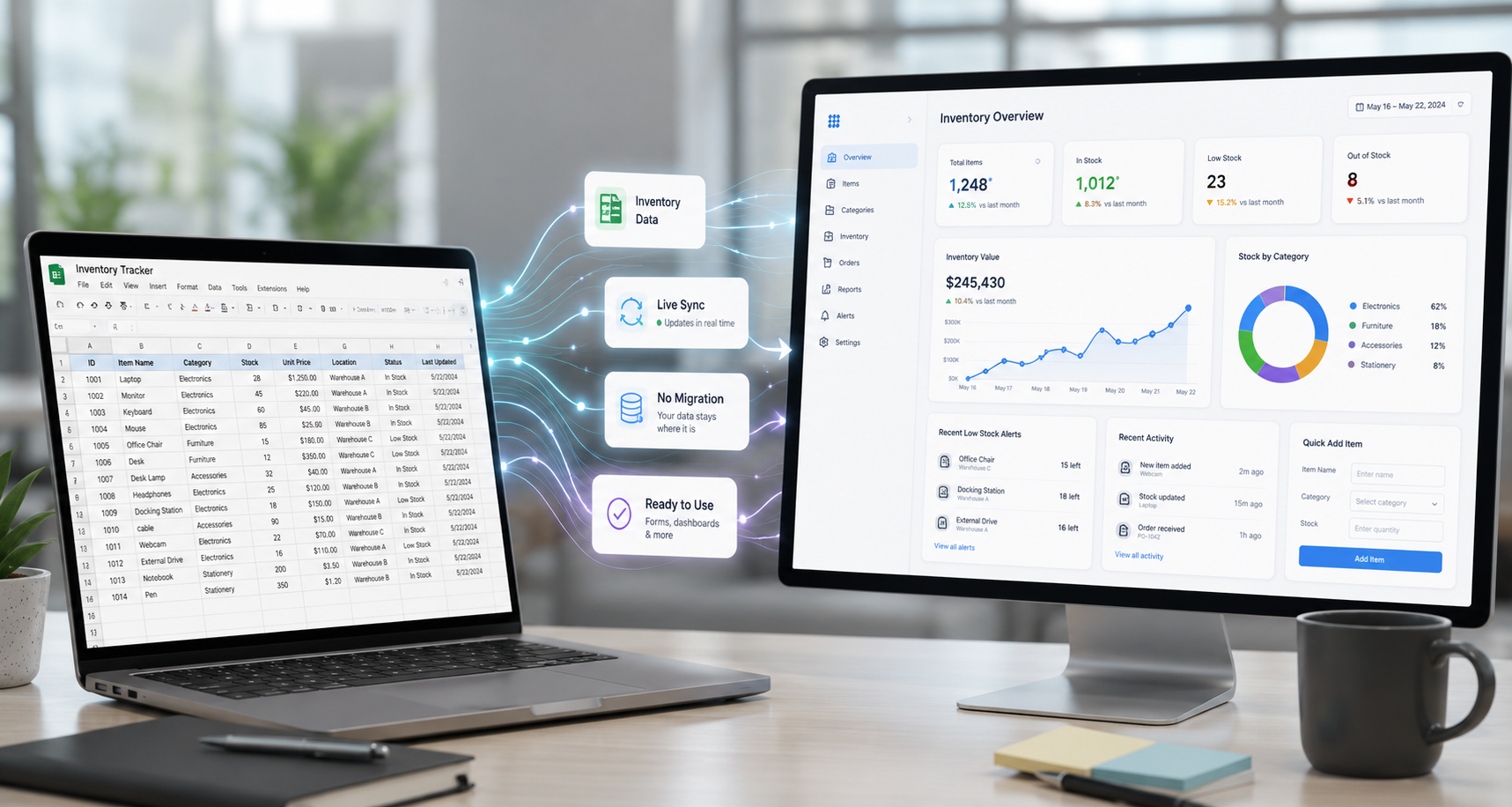
Turning a spreadsheet into an app means taking the data already living in a tool like Google Sheets, Excel, or Airtable and giving it a usable interface, such as a dashboard, form, or shared portal, without changing where the data lives. Instead of team members opening a spreadsheet file to find information, they see it through charts, tables, or forms built specifically for the task.
This approach is common among operations teams, IT managers, HR teams, and department heads who need a working tool for their team but don't have the time, budget, or developer resources to build something from scratch.
Why Businesses Outgrow Spreadsheets
Spreadsheets are a great starting point. They're flexible, familiar, and require no setup. But as a team grows, a few limitations tend to show up.
Manual updates become a problem. Someone has to keep the spreadsheet current, and mistakes or outdated entries are easy to miss.
Sharing a clean view with a team gets messy. Sending a spreadsheet file around means multiple versions, accidental edits, and confusion about which copy is current.
Connecting the spreadsheet to other tools is difficult. Most spreadsheets sit on their own, separate from the CRM, the helpdesk tool, or the project tracker a team also uses.
Data ends up scattered across files. Over time, a business might have a dozen spreadsheets covering inventory, requests, schedules, and reporting, each disconnected from the others.
None of these issues mean a business is doing anything wrong. They're just signs that the spreadsheet has reached the edge of what it can comfortably do, and it might be time for an interface on top of it.
Common Ways to Turn a Spreadsheet Into an App
There are a few general paths businesses take when they reach this point.
Hiring a Developer to Build a Custom App
A developer can build exactly what's needed, but this comes with real costs. Custom development usually means weeks or months of work, ongoing maintenance, and a budget that's often out of reach for small and mid sized teams.
Using a Database Tool That Requires Migrating Data
Some platforms ask businesses to move their data into a new database structure. This can work, but it means leaving the spreadsheet behind entirely. Anyone used to updating the spreadsheet now has to learn a new system, and the spreadsheet is no longer the source of truth.
Using a No Code Builder That Connects Directly to the Spreadsheet
A growing option is using a no code platform that connects to the spreadsheet as is. The data stays where it is. The platform reads from it (and in many cases writes back to it), and a team builds an interface on top using drag and drop tools. This is the approach that avoids both the cost of custom development and the disruption of a full data migration.
How to Connect a Spreadsheet to a No Code App Builder
The general process looks like this:
- Connect the spreadsheet. Link a Google Sheets file, Excel workbook, Airtable base, or similar source to the platform.
- Choose how the data should display. Decide whether a piece of data should appear as a table, a chart, a form field, or a summary statistic.
- Drag and drop widgets onto a canvas. Arrange the chosen elements into a layout that makes sense for the team using it.
- Publish a shareable portal or dashboard. Generate a link or embed the result so the team can access it without opening the original spreadsheet.
This whole process typically takes minutes rather than weeks, since there's no setup of servers, databases, or custom code involved.
What Happens to the Original Spreadsheet
This is one of the most common questions, and a fair one. When using a no code builder that connects directly to a spreadsheet, the spreadsheet stays exactly where it is. There's no duplication, no migration, and no new "master copy" to manage.
The spreadsheet remains the source of truth. The app builder reads from it (and can write back to it, depending on the platform) so updates made in the spreadsheet show up in the app, and in many cases, updates made through the app reflect back in the spreadsheet too. Anyone already used to working in the spreadsheet can keep doing so.
Common Spreadsheet to App Tasks
A few specific tasks come up again and again when teams start exploring this. Each one is covered in more detail in its own guide.
Creating Data Entry Forms
Instead of typing directly into spreadsheet cells, a form can be used to collect new entries cleanly, with validation and a simpler layout. See How to Create a Data Entry Form in Excel.
Building Inventory Trackers
Inventory data in a spreadsheet can be turned into a live tracker that shows stock levels, low stock alerts, and item details in one view. See How to Set Up an Inventory Tracker in Excel.
Adding E Signatures to Forms
Approval workflows often need a signature step. See How to Add E Signatures to Excel Forms.
Building Check Registers
Tracking payments and expenses in a structured, searchable way. See How to Build a Check Register in Excel.
Creating Dashboards From Airtable
Airtable bases can be turned into visual dashboards with charts and summary views. See How to Create an Airtable Dashboard.
Adding Workflows to Google Sheets
Google Sheets data can be connected to forms, approval steps, and notifications. See How to Add Workflows to Google Sheets.
Choosing the Right Tool
When evaluating a no code app builder for this kind of project, a few things are worth checking.
Data connectivity. Does the platform connect to the spreadsheet tools already in use, such as Google Sheets, Excel, or Airtable, without requiring a data migration?
Ease of use. Can someone without a technical background build and update the app, or does it still require a developer for changes?
Scalability. Will the platform work for a small team today and still hold up if the company grows or adds more data sources later?
Publishing and sharing. How easy is it to share the finished app or dashboard with a team, and what controls exist around who can see it?
For businesses comparing specific platforms, see No Code and Enterprise Software Alternatives: A Buyer's Guide.
Related Topics
Frequently Asked Questions
Build Your First App From a Spreadsheet With Huddle
Huddle is a zero code application builder that connects directly to the data sources teams already use, including Google Sheets, Excel 365, Airtable, HubSpot, Salesforce, and more. There is no migration and no duplication. The spreadsheet stays the source of truth, and Huddle gives a team a dashboard, form, or portal built on top of it using drag and drop widgets.
Start building with Huddle